2 minutes ago
AK1504 FM Sharp
Preset description:
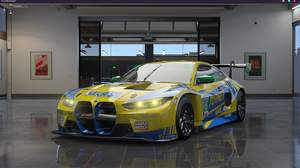
Just a bit sharpening that improves the image quality big time :D
All free to use shaders, nothing paid used.
Download the preset, and then choose this txt file during the ReShade Installation on the Effects screen: "Choose a preset file..." as i marked in the screenshot below.
https://i.ibb.co/Gv2PGmbj/Screenshot-2025-02-12-155145.png
Techniques=AdaptiveSharpen@AdaptiveSharpen.fx,ContrastAdaptiveSharpen@CAS.fx
[AdaptiveSharpen.fx]
curveslope=0.500000
curve_height=1.000000
D_compr_high=0.500000
D_compr_low=0.250000
D_overshoot=0.009000
L_compr_high=0.334000
L_compr_low=0.167000
L_overshoot=0.003000
pm_p=0.700000
scale_cs=0.056000
scale_lim=0.100000
[CAS.fx]
Contrast=0.000000
Sharpening=1.000000