4 days, 1 hour ago
AK1504 ReShade 2026
Preset description:
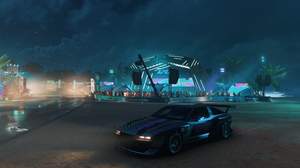
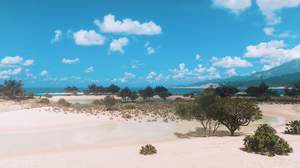
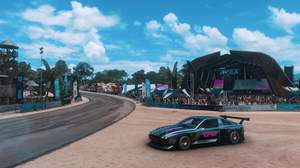
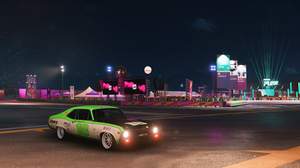
My personal custom ReShade for Forza Horizon 5 with adjusted colors, custom color LUT, sharpness, ambient light + custom lens effect
Important: Since i use a custom lens effect png and also a custom color LUT from https://github.com/TheGordinho/MLUT which the ReShade installer can not download when just downloading the shared settings preset and chosing it while installing ReShade i packed my settings ini and the complete "reshade-shaders" folder as 7z to download:
https://drive.google.com/file/d/1lXSdj7PIyfPW7WPdHBKvNWFr6zBCBn7i/view
Installation steps:
1. Download the 7z and unpack it's content to your game folder and game exe location "...\Forza Horizon 5\Content"
2. Download latest ReShade from https://reshade.me/#download
3. Double click your downloaded ReShade exe and chose the "gamelaunchhelper.exe" in your FH5 folder in "Game Location" step
4. Chose "DirectX 10,11,12" in the "Game rendering API" step
5. Chose my included "AK1504 ReShade 2026.ini" preset you unpacked to your FH5 folder in the "Select effects to install" step with "Browse..." button
6. Click "Finish" and start FH5 and press "Pos1" when mentioned on your screen and do or skip the ReShade tutorial and/or customize it's overlay, buttons and stuff
Also:
VirusTotal Scan Result of my packed files:
https://www.virustotal.com/gui/file/6e5d4c32f7b4fb093b60ef8ebf8466b609bc7c4b086882e8abc34494dbb52a4b/detection
Check and try out the LUT's in TheGordinho's insane MLUT repository and compare them with using your own ingame screenshots side by side:
https://vp-lut-tester.netlify.app/
Techniques=AmbientLight@AmbientLight.fx,prod80_04_ColorTemperature@PD80_04_Color_Temperature.fx,prod80_04_ContrastBrightnessSaturation@PD80_04_Contrast_Brightness_Saturation.fx,prod80_05_LumaSharpen@PD80_05_Sharpening.fx,Atmospheric_Film_Affinity_Presets_MLUT@Atmospheric Film Affinity Presets MLUT.fx
[AmbientLight.fx]
alAdapt=0.700000
alAdaptBaseBlackLvL=2
alAdaptBaseMult=1.000000
alDebug=0
alDirtInt=1.000000
alDirtOVInt=1.000000
alInt=5.000000
alLensInt=1.499000
alLensThresh=0.500000
alThreshold=15.000000
AL_Adaptation=1
AL_Adaptive=2
AL_Dirt=0
AL_DirtTex=0
AL_Dither=0
AL_Lens=1
AL_Vibrance=0
[Atmospheric Film Affinity Presets MLUT.fx]
bLUT_UseDepth=0
fLUT_AmountChroma=1.000000
fLUT_AmountLuma=1.000000
fLut_BlendPower=0.250000,0.250000
fLUT_DepthBlend=0.500000,0.500000
fLUT_LutSelector=47
GlobalControl=0.495000
[PD80_04_Color_Temperature.fx]
Kelvin=7000
kMix=1.000000
LumPreservation=1.000000
[PD80_04_Contrast_Brightness_Saturation.fx]
brightness=0.000000
brightnessD=0.000000
contrast=0.000000
contrastD=0.000000
depthCurve=1.000000
depthEnd=0.100000
depthStart=0.000000
display_depth=0
dither_strength=1.000000
enable_depth=0
enable_dither=0
exposureD=0.000000
exposureN=0.000000
huemid=0.000000
huerange=0.167000
saturation=0.000000
saturationD=0.000000
sat_a=0.125000
sat_b=0.125000
sat_custom=0.000000
sat_g=0.075000
sat_m=0.125000
sat_p=0.125000
sat_r=0.100000
sat_y=0.100000
tint=0.000000
vibrance=0.150000
vibranceD=0.000000
[PD80_05_Sharpening.fx]
BlurSigma=0.750000
depthCurve=1.000000
depthEnd=0.100000
depthStart=0.000000
display_depth=0
enableShowEdges=0
enable_depth=0
enable_reverse=0
limiter=0.100000
Sharpening=2.300000
Threshold=0.000000