SweetFX Settings DB
Latest forum threads
2 months, 2 weeks ago
by drift3
4 months, 3 weeks ago
5 months, 1 week ago
by Horace
5 months, 3 weeks ago

Dungeoneer

Preset for Erenshor
Created by Aurri
Added July 23, 2026
Updated 23 Jul 07:45 CEST
Shader used: ReShade
Preset description:
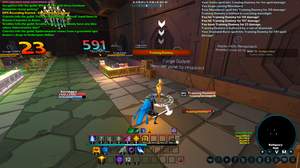
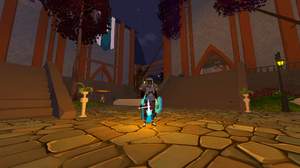
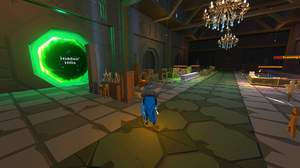
A jagged-edged, dithered and 32-bit colorspace preset for Erenshor. Aims to simulate PS1-era visuals through jagged edges and introduce depth by adding some banding on flat surfaces. Features a minimal number of effects and is easy to configure (no effects with 1 million sliders!) with lots of room for further customization. Visual adjustments present in-game such as vibrance and brightness were not touched by the preset.
Highly recommended to install and configure REST, otherwise the UI will become difficult to read. When configuring, be sure to find two layers. One for the in-game graphics and another for the nameplates! REST tutorial: https://www.youtube.com/watch?v=uoSA9_xGiZM Requirements: Reshade version with Addon support REST (To render the effect behind the UI) https://github.com/4lex4nder/ReshadeEffectShaderToggler Hybred Shaders (EdgeSharpen - for jagged edges) https://github.com/xHybred/Hybred-Shaders vort_Shaders (Motion Blur) https://github.com/vortigern11/vort_Shaders FXShaders (Dither) https://github.com/luluco250/FXShaders/tree/master
Download preset Show / Hide settings
Techniques=ContrastAdaptiveSharpen@CAS.fx,vort_MotionEffects@vort_Motion.fx,HDR@FakeHDR.fx,EdgeSharpening@EdgeSharpen.fx,Dither@Dither.fx TechniqueSorting=ContrastAdaptiveSharpen@CAS.fx,vort_MotionEffects@vort_Motion.fx,HDR@FakeHDR.fx,EdgeSharpening@EdgeSharpen.fx,EasymodeCRT@CRTEasymode.fx,Dither@Dither.fx [CAS.fx] Contrast=1.000000 Sharpening=1.000000 [Dither.fx] fDithering=0.250000 fQuantization=32.000000 iDitherMode=1 [EdgeSharpen.fx] EdgeStrength=0.550000 EdgeThreshold=0.300000 PixelationStrength=0.250000 SampleRadius=3 ShowEdges=0 [FakeHDR.fx] HDRPower=1.199998 radius1=0.793000 radius2=0.870000 [vort_Motion.fx] PreprocessorDefinitions=V_ENABLE_MOT_BLUR=2 UI_MB_BlurMult=1.000000 UI_MB_MaxSamples=9 _vort_Blur_Help_=0 _vort_Blur_MV_Discard_=0 _vort_MotionEffects_Help_=0
Comments

You need to be logged in to post a comment